Tire Size Calculator 2026 – Find the Perfect Fit Fast
Last updated on February 17th, 2026
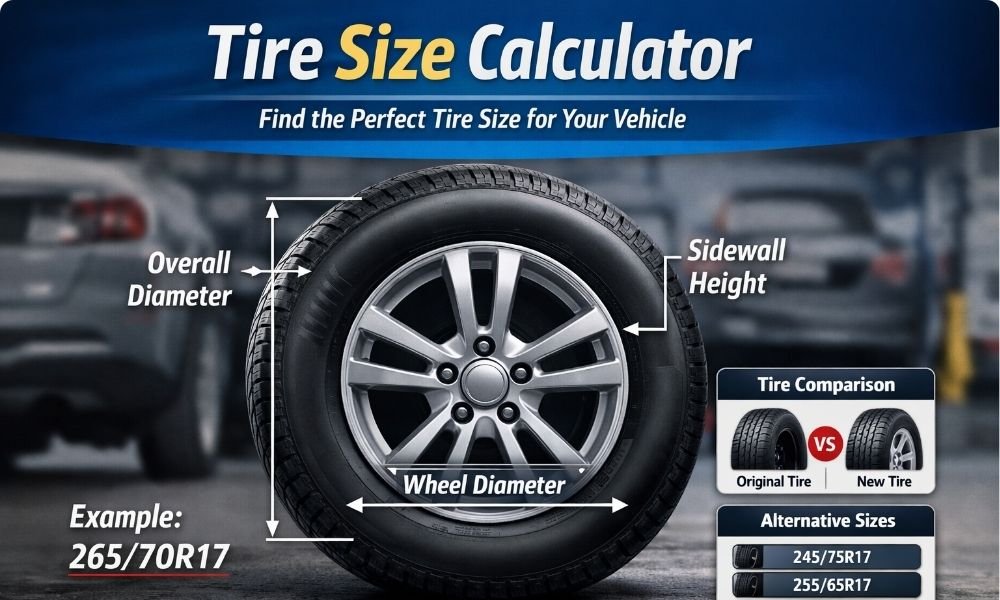
A tire size calculator quickly shows your tire’s diameter, sidewall height, circumference, and revolutions per mile so you can compare sizes and choose the right fit for your vehicle.
Changing tire size affects more than looks. Even small differences can change how far your car travels per wheel turn, which can throw off speed and distance readings.
That’s why this tool exists — instead of guessing or doing math by hand, you get instant, accurate measurements that help you make a confident decision before buying tires.
👉 Enter your tire specs below and calculate instantly.
Tire Size Calculator
Our Tire Size Calculator helps you calculate the exact dimensions of your tire based on standard tire size format (example: 265/70R17).
Summary Results
| Metric | Inches | Metric (mm) |
|---|
Visualization
Alternative Sizes
| Tire Size | Diameter (mm) | Width (mm) | Sidewall (mm) |
|---|
How to Use the Tire Size Calculator
Using the calculator is simple, even if you’ve never looked at tire numbers before. Just copy the numbers printed on your tire’s sidewall and type them into the matching boxes.
Enter tire width (mm)
Start with the first number on your tire. This is the width. For example, if your tire reads 265/70R17, the width is 265. Type that into the first field.
Enter aspect ratio (%)
The second number is the aspect ratio. This tells you how tall the tire’s sidewall is compared to its width. Using the same example, the aspect ratio is 70.
Enter wheel size (inches)
The last number is your wheel size. In 265/70R17, the wheel size is 17. Enter that exactly as shown.
Select if changing wheel size
If you’re planning to switch to a different wheel diameter, choose Yes and type the new wheel size. If you’re keeping the same wheels, just leave it on No.
Click Calculate
Once everything is filled in, hit the calculate button. The tool will instantly show your tire’s measurements, plus comparisons if you entered a new wheel size.
If something looks off in the results, double-check the numbers you typed. Most mistakes happen because one digit was entered wrong.
Understanding Your Tire Calculator Results
After you click calculate, the tool shows a few numbers. These tell you how your tire will actually behave on the road. If you know what they mean, it becomes much easier to decide whether a tire size is a good fit or not.
Tire Diameter
This is the full height of the tire from ground to top. A taller tire raises your vehicle slightly, while a shorter one lowers it.
Diameter matters because it affects clearance and speed readings. If the number changes too much, your tire could rub inside the wheel well or make your speed display slightly wrong.
Sidewall Height
Sidewall height is the thickness of the tire’s rubber between the wheel and the road. A taller sidewall usually feels softer over bumps. A shorter one feels firmer and more responsive when turning.
There’s a trade-off here. More comfort often means less sharp handling, while a sportier feel usually comes with a stiffer ride.
Circumference
Circumference is the distance your tire covers in one full rotation. Think of it as how far your car moves every time the tire spins once.
If this number changes, your car may travel a little farther or shorter than expected with each rotation. Small differences are fine, but large ones can affect accuracy and performance.
Revs per Mile
This shows how many times your tire spins to travel one mile. Smaller tires spin more times, larger tires spin fewer times.
This matters because your odometer and speed reading depend on rotation counts. If the revs per mile change too much, your dashboard readings may no longer match your actual speed or distance.
If you’re comparing two sizes, focus on how much these values change. Small differences are usually safe. Big jumps are a sign you should double-check before choosing that tire.
Visual Tire Size Comparison Explained
The graphic shows a simple visual of your tire so you can see the size instead of trying to picture it from numbers alone. I always tell people this is the fastest way to spot a big difference.
The outer circle represents the full tire height. If that circle looks much larger or smaller than your current setup, the change may affect how your vehicle sits or moves.
The inner circle shows the wheel itself. This helps you understand how much of the tire is rubber and how much is metal wheel.
The space between the two circles is the sidewall thickness. A thicker gap means more cushion from bumps. A thinner gap usually means a firmer ride.
This visual is helpful because most people don’t think in measurements. Seeing the difference makes it obvious right away whether a tire is slightly different or drastically different.
It’s not perfect, though. The image gives a clear comparison, but it can’t show clearance issues inside your wheel well. So use it as a quick guide, not the final decision.
Speedometer Accuracy Result Explained
The speedometer box shows whether your new tire size will change the speed your dashboard displays. Your car measures speed based on how fast the tires rotate, so when tire size changes, that reading can shift.
If you install a larger tire, it travels farther with each turn. That means your actual speed may be slightly faster than what your speedometer shows. Smaller tires do the opposite — they can make your speed display read higher than you’re really going.
In everyday driving, a small difference usually isn’t noticeable. But bigger changes can matter on highways or in areas with speed cameras, where even a few miles per hour can make a difference.
Most mechanics consider a difference of about ±3% to be safe. Anything beyond that is a sign you should double-check before choosing that size.
The calculator’s speed result helps you catch this early. It won’t adjust your car automatically, but it does give you a clear warning before you install the wrong tires.
Alternative Tire Sizes Table (Fitment Suggestions)
This table shows other tire sizes that can work on your vehicle. Think of it as a shortlist of options that are close enough to your original size to still be usable.
Each row gives you a quick comparison. You’ll see how much the size changes, whether the tire is wider or narrower, and how it might affect your speed reading. This saves you from guessing or doing the math yourself.
The percentage difference column is the most important one to watch. In most cases, staying within about ±3% keeps things safe and predictable. Numbers higher than that can start to affect how the car drives or reads speed.
The width change tells you if the tire will sit wider or slimmer than your current one. Slight changes are usually fine, but big increases can cause rubbing against the inside of the wheel area.
The speed impact column shows whether your real speed will be faster or slower than what your dashboard shows. Small changes are usually harmless, but large ones can throw things off more than you expect.
When looking through the table, don’t just pick the biggest or widest option. The best choice is usually the size closest to your original numbers while still giving you the look or performance you want.
If a size is far outside the recommended range, it’s better to skip it. Some options may technically fit on the wheel but still cause problems once you start driving.
This table is meant to guide you, not make the decision for you. It narrows down the safest choices so you can pick with confidence instead of guessing.
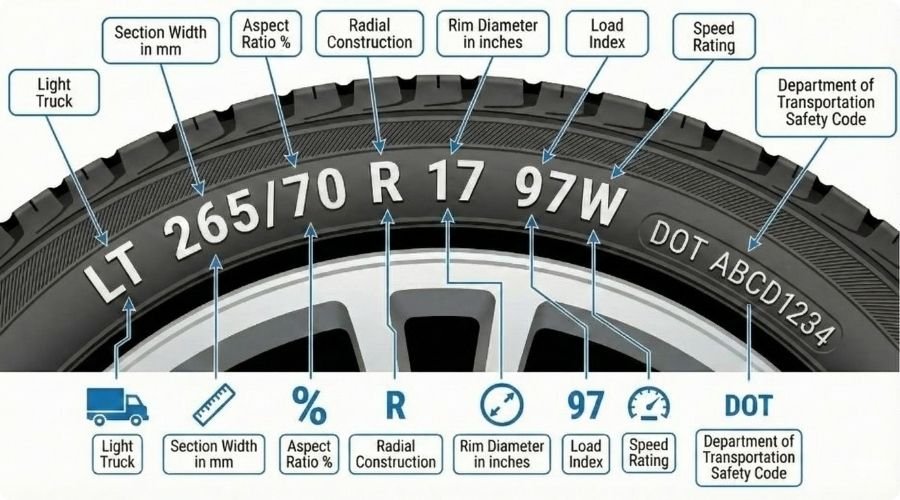
How to read a tire size (example: 265/70R17)
Look at the code on the tire and read it left to right. The example below shows what each part means so you can tell what size the tire actually is.
- 265 — This is the tire width in millimetres. It measures across the tread from one sidewall to the other.
- 70 — This is the aspect ratio. It means the sidewall height is 70% of the width (so taller or shorter sidewalls depend on this number).
- R — This shows the tire’s construction type: “R” means radial, which is the common construction for modern car tires.
- 17 — This is the wheel (rim) diameter in inches. The tire is made to fit a 17-inch rim.
A quick heads-up: even small changes in size can change your speedometer reading, ride height, and whether the tire rubs on the wheel well. If you plan to change sizes, compare the new tire’s overall diameter with your current one before you buy.
Tip: the easiest place to find the right sizes for your car is the sticker on the driver’s door jamb or the owner’s manual — match those numbers when possible.
When Should You Use a Tire Size Calculator?
You don’t need a calculator every time you buy tires. But there are certain situations where checking the numbers first can save you trouble later. I usually suggest using it anytime you’re thinking about changing something from your current setup.
If you’re planning to switch wheel sizes, the calculator helps you see how the new setup will affect your tire’s overall size. This makes it easier to avoid surprises after installation.
It’s also useful when going wider with tires. Wider tires can improve grip, but they don’t always fit the same way. A quick check shows whether the change is small and safe or big enough to cause issues.
Another good time to use it is when you want to check clearance. Even if a tire looks close in size, small differences can matter once the wheels turn or the suspension moves.
People often use the tool to compare a few possible sizes before choosing. Seeing the differences side by side makes the decision clearer and helps you avoid picking a size that looks good on paper but isn’t practical.
If you’re buying tires online, this step is especially helpful. You can’t test fit them first, so checking the numbers is the safest way to confirm they’ll work.
The calculator isn’t always required for simple replacements. If you’re buying the exact same size that came with your vehicle, you can usually skip it. But anytime you’re unsure, it’s worth taking a few seconds to check.
Benefits of Using This Tire Size Calculator
The biggest advantage is speed. Instead of trying to figure out tire measurements yourself, the calculator shows the results right away. You type in the numbers and get answers in seconds.
It also saves you from doing manual math. Tire numbers can be confusing if you’re not used to them, and even a small mistake can throw everything off. The tool handles the calculations for you so you don’t have to double-check formulas.
Another benefit is avoiding fitment mistakes. Choosing the wrong size can lead to tires that rub, feel off when driving, or don’t perform the way you expect. Checking first helps you catch problems before you buy anything.
It also makes it easier to pick a safe option. When you compare sizes side by side, you can quickly see which ones stay close to your original measurements and which ones go too far.
And honestly, it just saves time. Instead of searching forums or guessing based on charts, you get clear answers in one place.
That said, the calculator isn’t a replacement for common sense or professional advice. It’s a strong guide, but if you’re planning a big size change, it’s still smart to confirm with a tire shop or mechanic.
Common Tire Size Mistakes to Avoid
Changing tire size sounds simple, but small choices can cause big problems later. I’ve seen people buy new tires thinking they’ll fit fine, only to find out something feels off once they start driving. A quick check beforehand can prevent that.
Here are a few mistakes that happen most often:
- Going wider without checking space
Wider tires can look better and add grip, but they also take up more room. If there isn’t enough space inside the wheel area, the tire can rub when you turn or hit bumps. - Ignoring overall height changes
Even if the width looks close, the full height of the tire can be very different. A tire that’s too tall or too short can affect how the vehicle sits and drives. - Picking sizes far outside the safe range
Some sizes technically fit on the wheel but still push things too far. Large changes can affect handling, comfort, and how the car responds on the road. - Forgetting to check speed accuracy
Tire size affects how your vehicle measures speed. If the difference is big, your dashboard reading may not match your real speed.
Most of these mistakes happen because people rely on guesswork. Taking a minute to compare sizes first usually makes the decision much clearer and helps you avoid buying the wrong set.
Safe Tire Size Change Guidelines
Changing tire size is fine in many cases, but there are limits you shouldn’t cross. These limits exist to keep your vehicle driving the way it was designed to and to prevent problems you might not notice right away.
Here’s a simple rule most tire shops follow:
| Change | Safe Range |
| Diameter difference | about ±3% |
| Width increase | depends on wheel size |
The diameter limit matters because your vehicle’s systems are set up for a certain tire height. Staying within about three percent keeps things close enough that you usually won’t notice a difference while driving. Go beyond that, and the vehicle may feel off or behave differently on the road.
Width changes are less exact because they depend on the wheel you’re using. A slightly wider tire can work fine if the wheel supports it. But if the tire is too wide for the wheel, it may not sit correctly or could wear unevenly.
These limits aren’t random. They come from real-world testing and years of mechanical experience. They’re meant to keep your vehicle stable, predictable, and safe.
There’s a little flexibility, though. Some drivers go slightly outside these ranges for looks or performance. It can work, but the farther you go, the more careful you need to be.
Real Example Calculation Using the Tool
Let’s walk through a simple example so you can see how the calculator helps with a real decision. I’ll use a common situation: someone wants slightly larger wheels but isn’t sure which tire size will still work safely.
Input:
Current tire: 225/65R17
New tire option: 235/60R18
After entering those numbers, the calculator shows the results. You’ll see the new tire’s height, width change, and how much the overall size differs from the original.
Result: The tool might show a small percentage difference between the two sizes. Let’s say it reports a change of about +1.5% and a slightly wider width.
Interpretation: A small percentage like that usually means the new size is close enough to the original to work well. The slightly wider tire may improve grip and appearance without causing problems, as long as your vehicle has enough space.
If the calculator had shown something like +6%, that would be a warning sign. A difference that large can affect driving feel and accuracy readings, which is usually not worth the risk.
The key is to look at the size difference first, then check the other values. When the change is small and reasonable, you can feel more confident about choosing that tire.
Why Our Tire Size Calculator Is More Accurate
Accuracy matters when you’re comparing tire sizes. Even small measurement differences can affect how a vehicle drives, so the numbers need to be right. That’s why this calculator uses precise formulas instead of rough estimates.
The calculations are based on real tire measurement methods used in the automotive industry. These aren’t guess-based results or rounded shortcuts. The tool processes your exact inputs and gives measurements that match standard tire specs.
Results update instantly as soon as you enter new values. You don’t have to reload the page or redo anything. This makes it easier to test different sizes quickly and see how each change affects the numbers.
You’ll also see a visual comparison that shows size differences clearly. For many people, seeing the change is easier than trying to interpret measurements alone. It helps you spot major differences right away.
No calculator is perfect, though. Results are only as accurate as the numbers you enter. If a tire size is typed incorrectly, the output will be off too. That’s why it’s always worth double-checking your input before relying on the results.
Final Thoughts – Calculate Tire Sizes Before You Buy
Choosing the right tire size doesn’t have to be complicated. A quick check can help you avoid buying tires that don’t fit well or don’t perform the way you expect. It only takes a moment, and it can save you from costly mistakes later.
Before you decide on a new size, take a second to compare your options and see how they actually differ. Small changes are usually fine, but bigger ones are worth reviewing carefully.
Use the calculator above to compare tire sizes instantly and choose the safest option for your vehicle.
Tire Size Calculator FAQs
Is it safe to change tire size?
Yes, in many cases it’s safe, as long as the new size stays close to your original one. Small changes usually work fine, but large differences can affect how your vehicle drives. If you’re unsure, it’s best to compare the sizes first and stay within recommended limits.
What is the best tire size upgrade?
The best upgrade is usually one that’s slightly wider or slightly taller than your current tires while still staying close to the original measurements. Bigger isn’t always better. The safest choice is the size that gives you the look or feel you want without making big changes to overall dimensions.
Does tire size affect fuel economy?
Yes, it can. Larger or wider tires can make your engine work a bit harder, which may lower fuel efficiency. Smaller or narrower tires can sometimes improve mileage, but the difference is usually small unless the size change is big.
Can bigger tires damage the transmission?
They usually won’t if the size change is small. But much larger tires can put extra strain on the drivetrain over time because they change how the vehicle moves and shifts. That’s why big jumps in size are generally not recommended unless the vehicle is modified to handle them.
What tire size difference is acceptable?
Most experts suggest keeping the overall size difference within about 3% of the original tire. Staying within that range helps your vehicle perform normally and keeps your speed and distance readings close to accurate.
